
What Is Role Based Access Control (RBAC) and Why It’s the Backbone of Secure Access Management?
Last Updated date: February 7, 2026
On this page
See Tech Prescient in Action
Automate access, reduce risk, and stay audit-ready
Role-Based Access Control (RBAC) is an access control model that assigns system permissions based on predefined job roles. Instead of granting access to individual users, organizations assign permissions to roles, ensuring least privilege, easier access management, and improved security at scale.
As organizations grow and operating models shift toward hybrid and distributed work, access management becomes increasingly complex. Employees now access systems from multiple locations, across cloud and on-prem environments, using a constantly expanding set of tools. Legacy access models were not designed for this level of flexibility or scale, while insider risk and excessive permissions remain persistent security challenges.
RBAC addresses these challenges by introducing a clear, policy-driven structure for managing access at scale. By standardizing permissions around roles, RBAC enables organizations to maintain control, reduce administrative overhead, and align access with business responsibility. Understanding how RBAC works and how it is implemented effectively is critical for modern identity and access governance strategies.
Key Takeaways
- RBAC gives access based on job roles, so managing permissions gets easier.
- It follows the principle of least privilege, so people only get what they need.
- RBAC is built on core components including users, roles, permissions, and role hierarchies.
- The model applies consistently across HR, DevOps, and Finance.
- Identity Governance and Administration(IGA) platforms extend RBAC with automation, policy enforcement, and contextual access controls.
What Is Role-Based Access Control (RBAC)?
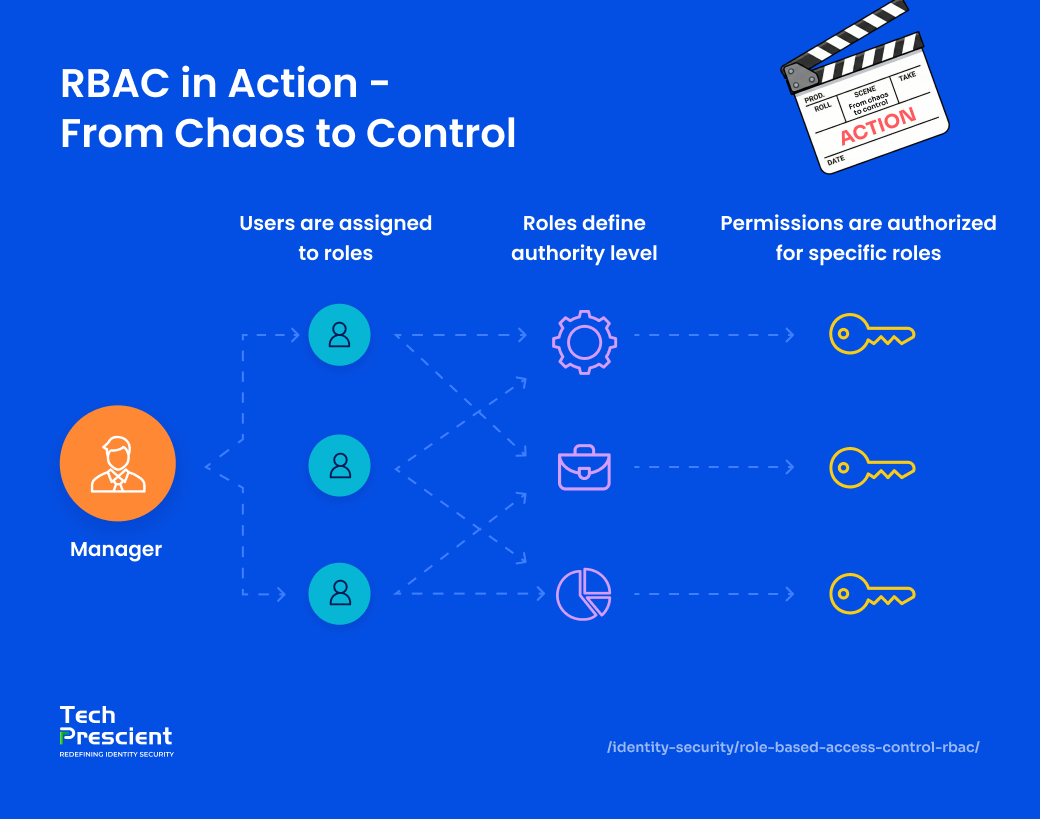
Role-Based Access Control (RBAC) is a security model that manages user access by assigning permissions to roles rather than individuals. Each role represents a job function, such as HR manager, developer, or finance analyst, and comes with a predefined set of permissions. Users inherit access by being assigned to roles, making access control simpler, more secure, and easier to audit.
By standardizing access around roles, RBAC ensures users receive only the permissions required to perform their duties. For example, an HR recruiter may be allowed to update employee records, while other employees may have view-only access. This structured approach reduces excessive permissions, improves auditability, and supports compliance requirements.
As organizations adopt hybrid work models, scale rapidly, and face increased insider risk, RBAC provides a reliable foundation for secure access management. It enables organizations to maintain control, enforce least privilege, and adapt access policies without introducing operational complexity.
Why RBAC Matters in Modern Cybersecurity?
RBAC reduces security risks by ensuring users only have access required for their role, helping organizations prevent insider threats, enforce least privilege, and meet compliance requirements.
A report from Gartner states that 70% of organizations will switch their access governance with models like RBAC by 2026.
Every organization manages sensitive systems and data. When users are granted more access than necessary, the risk of misuse, errors, and unintended exposure increases, even without malicious intent. At the same time, overly restrictive access controls can slow operations and impact productivity. RBAC addresses this challenge by aligning access with defined roles, allowing organizations to balance security and operational efficiency without constant manual intervention.
How RBAC Strengthens Cybersecurity
- Reduces errors during access provisioning and role changes
- Establishes consistent role definitions and access policies across departments
- Enforces least privilege by limiting access to what is strictly required
- Simplifies compliance with regulations such as SOX, HIPAA, and GDPR
Not sure how strong your RBAC really is?
Take a 2-minute RBAC readiness check and see where access risk is hiding.
Core Components of RBAC
Every effective RBAC system is built on four core pillars: Users, Roles, Permissions, and Role Hierarchies. These elements work together to create a structured, scalable approach to access control. By understanding and designing each component clearly, you can avoid common pitfalls like access creep, inconsistent privileges, or manual errors, and ensure your RBAC setup remains secure and easy to manage as your organization grows.
Users
Users represent any entity that requires access to systems or data. This includes human users, service accounts, machines, bots, and API identities. Rather than assigning permissions directly to each user, access is granted through role assignment. This approach simplifies provisioning and ensures consistency. In more advanced implementations, a user may be assigned multiple roles, allowing access to reflect all assigned responsibilities without manual adjustment.
Roles
Roles define access based on job function or responsibility. Examples include HR manager, developer, or sales representative. Each role contains a predefined set of permissions required to perform that function. Because roles can be assigned to many users, organizations can manage access at scale without maintaining individual permission sets. When users hold multiple roles, their effective access is the combined permissions of those roles, supporting flexibility without increasing complexity.
Permissions
Permissions specify the actions that can be performed within a system, such as viewing data, modifying records, deleting resources, or accessing applications. Permissions are associated with roles rather than individual users. When a permission is added to or removed from a role, the change is applied consistently to all users assigned to that role. This centralized control reduces manual effort and minimizes the risk of configuration errors.
Role Hierarchies
Role hierarchies allow roles to be structured so that higher-level roles inherit the permissions of lower-level roles. For example, a senior engineer role may include all permissions of an engineer role, along with additional access. This inheritance model eliminates the need to duplicate permissions across roles, simplifies role design, and improves long-term maintainability of the access framework.
Not sure how strong your RBAC really is?
Take a 2-minute RBAC readiness check and see where access risk is hiding.
Types of Role-Based Access Control (RBAC)
RBAC can be implemented in different ways depending on an organization’s size, operational complexity, and compliance requirements. The most common RBAC models are outlined below.

Basic RBAC
Basic RBAC assigns permissions directly to roles, and users inherit access through role assignment. This model is effective for organizations with well-defined job functions and relatively simple access requirements. It provides a straightforward way to manage permissions without introducing additional structural complexity.
Hierarchical RBAC
Hierarchical RBAC extends the basic model by introducing role inheritance. In this structure, higher-level roles automatically inherit the permissions of lower-level roles. For example, a manager role may include all permissions assigned to an employee role, along with additional access. This approach reduces duplication and simplifies role management as organizations scale.
Constrained RBAC
Constrained RBAC introduces policy-based restrictions to enforce controls such as segregation of duties. These constraints prevent conflicting permissions from being assigned to the same user. For example, a single user may be restricted from both creating and approving financial transactions. This model is commonly used in environments with strong compliance and risk management requirements.
Real-World Examples of RBAC
Role-Based Access Control (RBAC) helps manage access to resources by assigning permissions based on a user's role within the organization. This approach ensures that individuals have only the access they need to do their jobs, nothing more, thereby minimizing the risk of unauthorized access and data breaches. Let’s explore some real-world examples to understand how it works in practice.
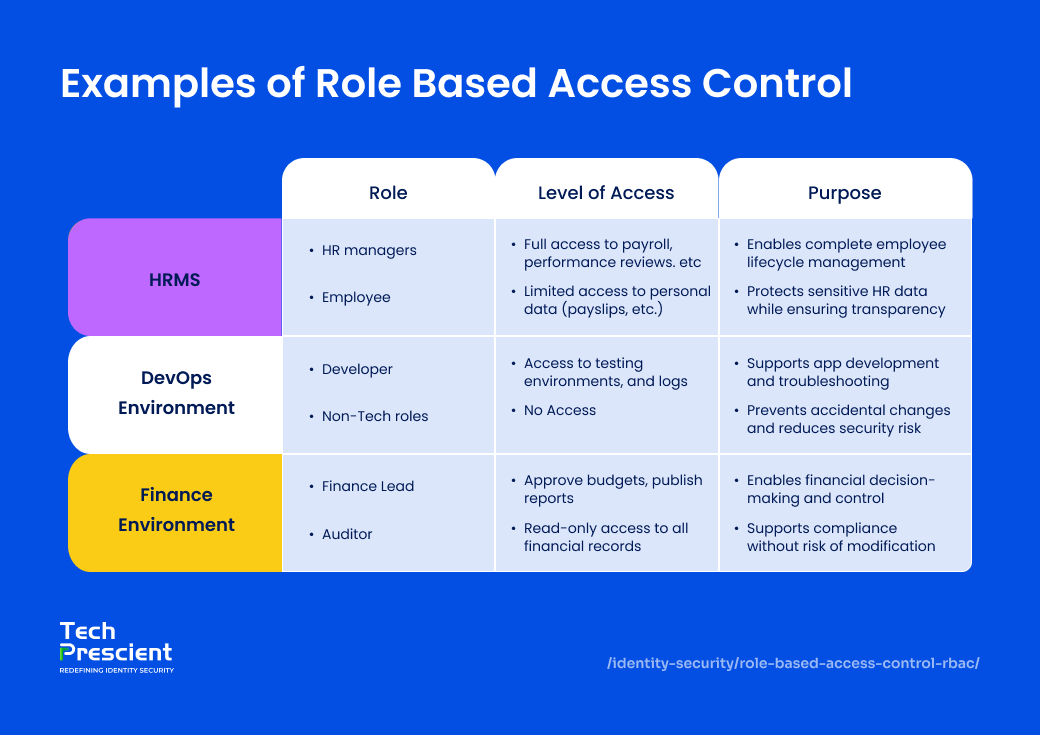
HRMS (Human Resource Management Systems)
In HR systems, access is segmented based on job function. HR managers typically require full access to manage payroll, performance reviews, and onboarding documentation. In contrast, employees are granted limited access to view personal information such as payslips, leave balances, and tax records. This separation ensures sensitive data remains protected while maintaining appropriate access for all users.
DevOps Environment
In technical environments, RBAC restricts access to critical infrastructure and development tools. Developers and DevOps engineers are granted access to testing environments, deployment pipelines, and system logs based on operational requirements. Other departments, such as Finance or HR, are excluded from these systems entirely. This role-based separation reduces risk, protects production environments, and minimizes the likelihood of accidental changes.
Finance Department
In finance tools like ERP systems, access is carefully tailored to roles. Finance leads have access to approve budgets, update payment records, and publish reports, while auditors are given read-only access; they can review everything but can’t make any changes. This setup maintains security, supports compliance, and ensures there’s a clear, auditable trail of every action.
Benefits of Role-Based Access Control
Role-Based Access Control (RBAC) provides a structured approach to managing access that improves security, simplifies administration, and supports organizational growth. By aligning access with defined roles, RBAC delivers measurable operational and security benefits across environments.
Enforces the Principle of Least Privilege
RBAC ensures users are granted access only to the resources required to perform their job functions. By limiting permissions to defined roles, organizations reduce the potential impact of errors, misuse, or compromised accounts. This controlled access model helps contain risk and supports a consistent least-privilege strategy across the enterprise.
Streamlines Permission Management
RBAC simplifies onboarding and role changes by eliminating the need for individual permission assignment. When a user joins the organization or changes roles, access is adjusted by assigning or updating their role membership. This approach reduces administrative effort, accelerates access provisioning, and minimizes configuration inconsistencies as teams scale.
Reduces Manual Provisioning Errors
Manually assigning access often leads to problems; someone gets too much access or not enough to do their job effectively. RBAC eliminates that guesswork. Once roles are set up, they can be consistently applied across the organization, reducing errors and keeping security tight without the need for constant oversight.
Supports Auditability & Compliance
RBAC improves audit readiness by establishing clear relationships between users, roles, and permissions. Auditors can easily verify who has access to which systems and why that access exists. This clarity supports compliance like HIPAA,GDPR with regulatory frameworks by enabling consistent access reviews, traceability, and reliable audit reporting.
Scales Across Cloud, SaaS, On-Prem
RBAC is well suited for hybrid environments that span cloud platforms, SaaS applications, and on-prem systems. Roles are defined once and can be applied consistently across cloud platforms, SaaS tools, and even legacy systems, eliminating the need to rebuild access controls every time your tech stack evolves.
Avoid This
Giving temporary admin access “just for now” often becomes permanent. Review elevated permissions regularly to prevent silent privilege creep.
RBAC vs DAC vs ABAC
RBAC focuses on role-based permissions, DAC relies on data owners to grant access, and ABAC uses contextual attributes like location, time, and device to make access decisions.
Every organization has unique needs; some prefer a straightforward setup, while others require more flexibility or tighter control. Access management isn’t a one-size-fits-all approach, which is why there are different models like RBAC (Role-Based Access Control), DAC (Discretionary Access Control), and ABAC (Attribute-Based Access Control). Each has its strengths, and understanding how they work can help you choose the right fit for your environment.
| Feature | RBAC | DAC | ABAC |
|---|---|---|---|
| Based On | Based on predefined roles within the organization | Based on data ownership and user-defined permissions | Based on multiple contextual attributes like role, time, or location |
| Flexibility | Medium - fixed roles offer structured flexibility | High-level users control who accesses their data | Very High - highly dynamic access decisions based on attributes |
| Ease of Use | Easy - straightforward to assign and manage | Complex - depends on user decisions and setup | Complex - requires detailed attribute mapping and policy rules |
| Best For | Enterprises with defined job functions | Small teams with informal structures | High-security organizations need fine-grained access control |
Choosing between RBAC and ABAC comes down to prioritizing structure or flexibility. RBAC keeps things straightforward by assigning access based on roles, making it easy to manage, especially when job titles and responsibilities are clearly defined. ABAC, on the other hand, offers more granular control by factoring in attributes like location, time, or device, making it highly flexible but more complex to implement. The right choice depends on what your organization values most: simplicity, security, or strict compliance.
Access Control Model Selection Guide
A structured guide to selecting and governing access control models
How to Implement RBAC in Your Organization?
Implementing RBAC involves defining roles, assigning permissions, mapping users to roles, and regularly reviewing access to prevent privilege creep. A disciplined implementation helps ensure RBAC delivers long-term security and operational value.
Define Organizational Roles - Start with Who Does What
Start by identifying roles in your organization based on actual responsibilities, not just job titles. For instance, a marketing team member may need access to campaign tools and analytics, while a support agent needs visibility into tickets and customer data. Group individuals with similar tasks into well-defined roles. Keeping these roles clear and consistent makes access management easier to implement and even simpler to monitor over time.
Assign Permissions to Roles - Match Access with Purpose
Once roles are established, determine the specific permissions required for each role. Permissions should align strictly with job responsibilities and follow the principle of least privilege. For example, a finance manager might need access to payroll and invoicing tools but have no reason to access the codebase. By keeping permissions tightly aligned with job responsibilities, you reduce unnecessary access and strengthen overall system security.
Users to Roles - Let HR or IT Do the Heavy Lifting
After defining roles and permissions, assign users to the appropriate roles through an identity management or HR-integrated system. This approach ensures new hires receive the correct access upon onboarding and that access changes automatically when users change roles or responsibilities. Automating role assignments improves accuracy, reduces manual effort, and maintains consistency across the organization.
Regularly Audit & Refine - Keep Access Clean as You Grow
RBAC requires ongoing maintenance. As employees change roles, leave the organization, or take on new responsibilities, access must be reviewed and adjusted accordingly. Regular access reviews help identify outdated permissions, unused accounts, and misaligned roles. Periodic audits ensure the RBAC model remains aligned with organizational changes and continues to enforce least privilege effectively.

Pro Tip
Start small, implement RBAC in one department first. Test, refine roles, and scale organization-wide once the structure works smoothly.
How Our IGA Platform Powers RBAC?
Modern RBAC works best when combined with identity governance, automation, and continuous access reviews.
Modern environments require access controls that adapt to organizational change while maintaining consistent policy enforcement. Tech Prescient integrates RBAC directly into its Identity Governance and Administration(IGA) platform to support scalable, policy-driven access management.
Dynamic Role Management
Roles within a company naturally evolve as teams expand, projects shift, and responsibilities change. Our platform adapts to these changes automatically. When someone switches roles, joins a new team, or takes on additional tasks, their access adjusts seamlessly. This ensures your access controls remain accurate and up to date, no matter how your organization grows or transforms.
Context-Aware Access Provisioning
Traditional RBAC relies primarily on job function. The IGA platform extends this model by incorporating contextual signals into access decisions. Factors such as device posture, network location, IP address, and time of access are evaluated to adjust permissions dynamically. This approach allows organizations to maintain strong security controls while preserving user productivity across different access scenarios.
Access Certification Workflows
Privilege accumulation remains a common access risk as users change roles or responsibilities. The platform supports structured access certification workflows that prompt periodic reviews by managers and application owners. These reviews help validate ongoing access requirements, remove outdated permissions, and reduce the risk associated with excessive or unused access.
Real-Time Policy Enforcement
Access policies are centrally defined and enforced consistently across cloud, on-prem, and hybrid environments. The platform’s real-time policy engine eliminates the need to duplicate access rules across individual systems. This centralized enforcement model improves consistency, reduces administrative overhead, and ensures access controls remain aligned with organizational policy.
Final Thoughts
Role-Based Access Control (RBAC) provides a structured and practical approach to managing access within an organization. By aligning permissions with defined roles, RBAC brings clarity to access decisions, reduces unnecessary exposure, and simplifies administration as environments grow in size and complexity. It enables organizations to control who can access systems and data without relying on manual, user-specific configurations.
When implemented correctly, RBAC reduces security risk, supports compliance efforts, and scales efficiently alongside organizational change. Tech Prescient helps organizations design and operate secure, scalable access frameworks with RBAC as a foundational control, integrated into broader identity governance strategies.
Book a demo with Tech Prescient today and see how effortless and secure access management can be.
FAQs
RBAC grants access based on predefined job roles. Users receive permissions according to their assigned role, making the model straightforward to implement and manage. ABAC evaluates access using additional attributes such as department, location, time, device, or risk context. While ABAC offers greater flexibility and fine-grained control, it also introduces additional complexity in policy design and enforcement. This makes RBAC simpler to manage, while ABAC offers greater flexibility at the cost of complexity.
- RBAC (Role-Based Access Control): Access is assigned based on organizational roles.
- DAC (Discretionary Access Control): Data owners determine who can access specific resources.
- MAC (Mandatory Access Control): Access is governed by strict system-enforced policies, often used in highly regulated or military environments.
- ABAC (Attribute-Based Access Control): Access decisions are based on multiple contextual attributes evaluated at runtime.
- Basic RBAC: Permissions are assigned to roles, and users inherit access through role membership.
- Hierarchical RBAC: Roles are structured so higher-level roles inherit permissions from lower-level roles.
- Constrained RBAC: Additional rules, such as segregation of duties, are enforced to prevent conflicts of interest and reduce risk.


GET A PERSONALIZED DEMO
See Identity Confluence in Action
“One platform to govern identities, automate access decisions, and prove compliance; across every app, user, and system in your environment.”


