What Is the Main Benefit of Automated Provisioning?


Automated Provisioning automatically grants, updates, and removes user access to applications, systems, databases, and data in real time. Rather than relying on manual, ticket-driven processes, access changes are triggered instantly through predefined policies mapped to roles, attributes, departments, or key business events such as onboarding, transfers, and offboarding. This streamlines workflows, minimizes human error, and enforces the principle of least privilege across your entire digital environment. This speeds up onboarding and offboarding while ensuring that individuals receive or surrender the appropriate access whether they join the organization, transition between positions, or leave the company.
By replacing manual steps with intelligent automation, organizations reduce configuration mistakes and maintain consistent access policies across all systems. Automated provisioning applies role-based access controls across hundreds of applications, minimizes the risk of overprivileged accounts, and gives IT teams back their time to focus on higher-value security and technology initiatives. It helps maintain accuracy, efficiency, and strong identity governance at scale.
Recent studies by GBEJ (Global Business & Economics Journal) show that organizations using automated identity governance tools have achieved a 90 percent reduction in onboarding time for employees and contractors, significantly improving productivity. Explore the full blog to dive into efficiency improvements, security benefits, compliance readiness, and the inner workings of automated provisioning. Let’s get started.
Key Takeaways:
-
Understand why efficiency is the biggest advantage of automated provisioning and how it cuts onboarding time from hours to minutes.
-
Learn how automation boosts accuracy and consistency with role-based access control, predefined policies, and error-free provisioning.
-
Discover how automated provisioning strengthens security through timely deprovisioning and reduced insider risk.
-
See how automation improves compliance and audit readiness with clear logs and policy enforcement.
-
Explore how automated provisioning scales with growing enterprises without increasing IT workload.
1. Increased Efficiency: The Core Benefit
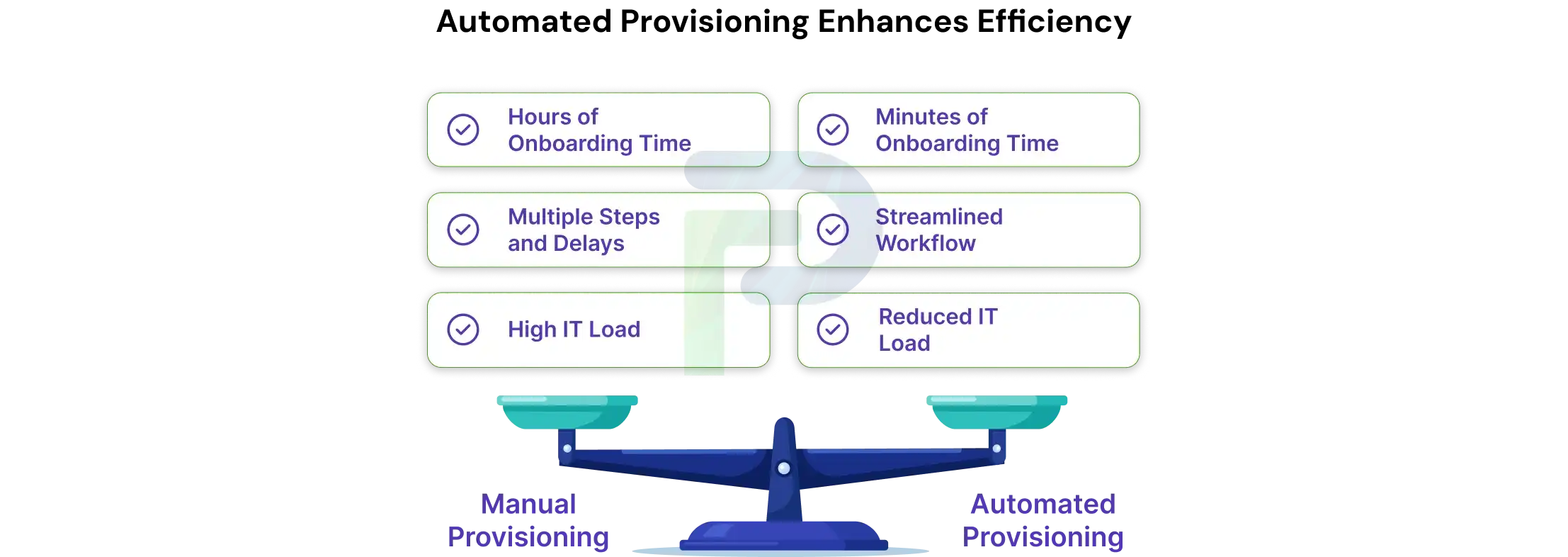
Automated provisioning significantly improves operational efficiency by replacing slow, manual access setup with intelligent, policy-driven workflows. When there is a new employee or someone changes job positions, IT teams must ensure the user receives secure access to all the resources required for their role. They need to create user accounts for the right applications, set modular privileges, assign system credentials, update access as roles change, and remove access when the user leaves the business. Doing this manually is a huge and time-consuming task. With automated provisioning, these steps are executed automatically through predefined roles and workflows, resulting in faster onboarding and far more streamlined IT operations.
How Automation Makes a Difference:
-
Faster User Onboarding: New employees or contractors get access to required systems in minutes rather than hours, reducing delays in productivity.
-
Reduced Manual Errors: Automation removes human error from repetitive tasks like account creation, role assignment, and permission configuration.
-
Consistent Role-Based Access: Predefined templates and workflows ensure access is applied uniformly across all applications.
-
Policy and Compliance Enforcement: Automated validation against organizational policies ensures secure and compliant access at every step.
-
Optimized IT Resources: IT teams spend less time on routine tasks and more time on strategic projects, improving overall efficiency.
By eliminating repetitive manual steps, automated provisioning not only saves time but also improves reliability and consistency across IT operations. It enables organizations to onboard more users efficiently, maintain compliance, and focus on strategic initiatives rather than troubleshooting errors from manual provisioning processes.
2. Improved Accuracy and Consistency
Automated provisioning ensures that access policies are applied consistently across all systems, significantly reducing errors and misconfigurations. Manual provisioning often requires IT teams to enter user data, assign roles, and configure permissions across multiple applications, a process prone to mistakes such as typos, overlooked steps, or incorrect access assignments. These errors can lead to security gaps, operational delays, and failed provisioning tasks. Automated provisioning replaces these manual steps with intelligent, rule-based workflows, improving accuracy and ensuring that every user receives the correct access consistently.
How Automation Enhances Accuracy:
-
Role-Based Access Control: Access is assigned based on predefined roles, ensuring users receive the correct permissions according to their job function.
-
Standardized Workflows: Repeatable processes eliminate inconsistencies and reduce reliance on manual intervention.
-
Data Validation and Error Detection: Automated checks identify and correct errors instantly before they impact provisioning tasks.
-
Cross-System Consistency: Information from HR or other systems is automatically synchronized across all applications, preventing mismatched or missing access.
-
Policy Enforcement: Access configurations are continuously validated against company policies and compliance standards to ensure accuracy and security.
By systematically reducing manual errors, automated provisioning improves operational reliability, strengthens compliance, and ensures consistent application of organizational policies. IT teams can manage access confidently across the enterprise, minimize downtime, and focus on strategic initiatives rather than correcting mistakes from traditional manual provisioning processes.
3. Enhanced Security and Reduced Risk
Automated provisioning strengthens organizational security by ensuring that access is granted precisely according to each user’s role. By enforcing policies based on the principle of least privilege, only the necessary permissions and resources are provided to users, preventing over-privileged access. This reduces the chances of sensitive data being exposed or compromised, giving security teams confidence that access rights align with organizational standards.
Key Security Benefits:
-
Role-Based Access Controls: Automated provisioning applies granular, role-based permissions to users, ensuring that employees only access applications, data, and systems relevant to their job functions. This minimizes the risk of accidental or intentional misuse of sensitive information and enforces consistent security practices across the enterprise.
-
Just-in-Time Access Management: Automation enables dynamic permission assignment and revocation. Users receive access when needed and lose it immediately when it is no longer required. This reduces the attack surface by limiting inactive or unnecessary accounts, which are often prime targets for cyberattacks.
-
Audit Trails and Monitoring: The system generates comprehensive logs of all provisioning activities, including access changes, policy enforcement, and exceptions. Continuous monitoring and reporting allow IT and security teams to track user activity, detect anomalies, and respond proactively to potential insider threats or unauthorized access attempts.
By implementing automated provisioning, organizations can maintain a stronger security posture, reduce the risk of insider threats, and enforce timely deprovisioning. This not only protects sensitive data but also supports compliance, operational reliability, and overall organizational resilience against security risks.
4. Better Compliance and Audit Readiness
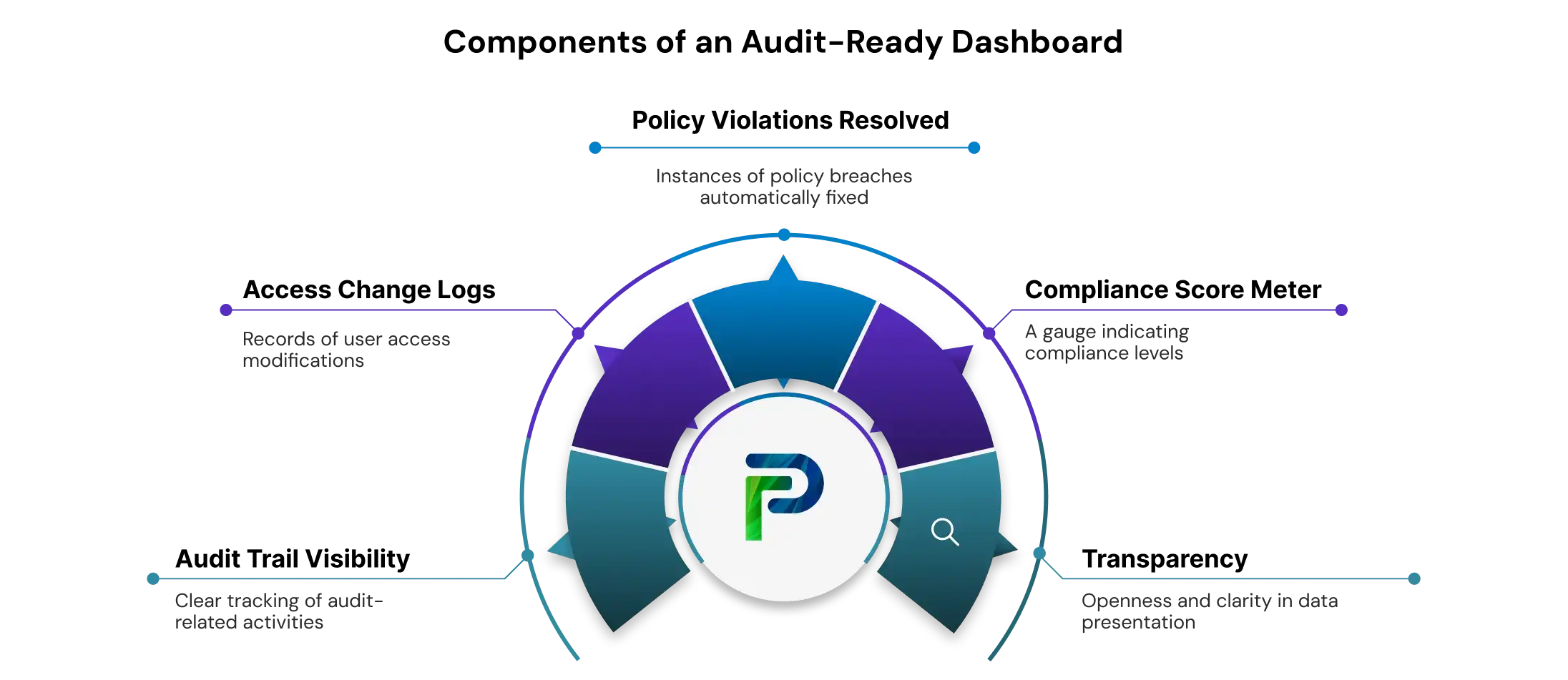
Automated provisioning gives organizations a reliable, auditable record of who accessed what, when, and how, which makes compliance reporting and accountability much easier. Instead of relying on scattered manual logs and ad hoc tracking, every access change, including grants, updates, or revocations, is logged automatically. This transparency ensures consistent adherence to internal access policies and external regulations. Combined with role-based controls and automated deprovisioning, the process becomes audit-ready and governance-friendly.
How Automation Strengthens Compliance and Audit Readiness:
-
Comprehensive Audit Logs for Every Access Change
Automated provisioning systems record each access modification, including who made it, at what time, and which permissions were changed. This means provisioning activity is traceable and verifiable. During audits, these logs provide clear evidence of compliance with access policies, role assignments, and timely deprovisioning when required. -
Consistent Enforcement of Policy-Based Access Controls
Access assignments follow predefined roles and policies, such as least privilege, roles, or attributes. Permissions are granted and revoked uniformly across all systems, ensuring the organization maintains a stable compliance posture across diverse applications and platforms. -
Support for Regulatory Frameworks (SOX, HIPAA, ISO, GDPR, etc.)
Automated provisioning helps organizations meet the requirements of regulatory frameworks that demand strict access control, documentation, and audit readiness. By automating permission assignment, revocation, and logging, companies can align with standards such as SOX, HIPAA, ISO 27001, GDPR, and more, showing auditors that access governance is under control. -
Reduced Risk of Orphan or Excess Privilege Accounts
The system automates deprovisioning when a user leaves or changes roles, avoiding old accounts with lingering privileges that pose security and compliance risks. Automated workflows ensure permissions are revoked promptly, minimizing exposure and reducing audit-related risks. -
Centralized Visibility and Governance Oversight
Automated provisioning centralizes access data, making it easy for governance, compliance, or security teams to monitor who has access to what. Managers can review permissions, audit history, and access patterns in one place, facilitating periodic reviews, access recertification, and proactive compliance audits.
With automated provisioning in place, compliance and audit readiness become a natural part of everyday operations, not a scramble at audit time. Organizations get consistent policy enforcement, full traceability, and strong governance over access, enabling smoother audits, lower compliance risk, and better overall control.
5. Scalability for Growing Enterprises
Automated provisioning makes it far easier for organizations, small or large, to scale their user and application environment without proportionally increasing IT overhead. As companies grow, hire more people, adopt more applications (cloud, on-prem, SaaS), or expand into hybrid infrastructure, manual provisioning becomes unsustainable. Automation ensures that access management grows with the business seamlessly, keeping onboarding, role changes, and deprovisioning efficient and error free even at scale.
Key Ways Automated Provisioning Supports Enterprise Growth
-
Bulk Onboarding and Offboarding with Minimal Effort
Automated provisioning supports bulk operations so that entire teams or large batches of users can be onboarded or offboarded in one go. Instead of individually configuring each user across dozens of systems, admins define workflows once, and the system applies required permissions and access rights automatically to all relevant applications. This removes the bottleneck that manual provisioning creates when staffing increases rapidly or during mass hiring drives. -
Consistent Role-Based Access Across Diverse Systems
With predefined roles, role-based access control (RBAC), and policy templates, automated provisioning ensures the same access patterns are applied uniformly whether the applications are legacy on-prem, cloud-based, or SaaS. This consistency removes the complexity of managing different systems and configurations one by one, making it easier to add new apps or platforms as the enterprise grows. -
Support for Cloud and Hybrid Infrastructure Dynamics
As enterprises increasingly adopt cloud services or hybrid IT environments, resource allocation and access requirements can change frequently. Automated provisioning adapts to these dynamics: when users join, change roles, or leave, the system updates permissions instantly across cloud, hybrid, and on-prem systems. This agility ensures scalability both in headcount and infrastructure footprint without extra manual effort. -
Optimized IT Resources and Lower Operational Costs
Automation reduces the need for a large IT staff to manage provisioning tasks manually. As user numbers grow, the incremental cost of provisioning each new user becomes negligible. This leads to better resource utilization, lower per-user overhead, and ultimately a stronger return on investment (ROI), making automated provisioning a cost-effective foundation for growth. -
Faster Time-to-Access and Improved User Experience at Scale
For large or growing enterprises, delays in provisioning can impact productivity across teams. Automated provisioning ensures that new hires or role-changed employees receive access to necessary tools almost instantly. This helps maintain smooth operations even as the workforce expands rapidly, avoiding bottlenecks in onboarding or role transitions.
With automated provisioning, scaling up becomes much simpler and predictable. Whether you onboard a handful of employees or hundreds, or expand across cloud and legacy systems, access management remains efficient, consistent, and secure. In a growing enterprise, this translates to better performance, lower overhead, and a more agile IT environment.
6. Speeds up user onboarding processes
Automated provisioning helps organizations get employees and contractors set up quickly, ensuring they have access to the tools they need from day one. By eliminating manual steps, IT teams can accelerate onboarding while maintaining accuracy and security.
Ways Automation Accelerates Access:
-
Streamlined Workflows for Quick Access
Automated workflows grant permissions automatically based on predefined triggers. For example, new finance team members can instantly receive access to tools like Spendflo, Vendr, and SpendHQ, saving IT teams time. -
Parallel System Integration and Role-Based Setup
Multiple systems can be configured simultaneously. Role-based access ensures users get the right permissions across all applications without manual intervention. -
Immediate Cross-Platform Access
Employees receive credentials and permissions across all platforms as soon as onboarding occurs, allowing them to start work without delays. -
Reduced Onboarding Time
Automation compresses onboarding from days or weeks to minutes, letting new hires become productive immediately and helping organizations scale efficiently.
With automated provisioning, onboarding is faster, more reliable, and consistent, freeing IT teams to focus on strategic tasks while employees gain instant access to the resources they need.
7. Minimizes user onboarding costs
Automated provisioning allows organizations to optimize IT and HR resources by automating user access workflows. Instead of manually configuring permissions for every system or application, IT teams can rely on predefined workflows within their IAM solution. This reduces onboarding time, cuts operational costs, and allows personnel to focus on higher-value projects.
Maximizing Efficiency and Reducing Operational Costs with Automation:
-
Streamlined Onboarding Processes
Automation links HR systems to central directories, ensuring new hires receive access to required resources promptly and accurately. This eliminates delays caused by manual setup and ensures employees can start work immediately. -
Lower Labor and Resource Requirements
Manual provisioning involves multiple verification and authentication steps, consuming significant time and effort. Automation reduces labor needs and operational bottlenecks, allowing IT teams to focus on strategic initiatives. -
Template-Based Provisioning for Speed
Predefined templates in automation tools allow user accounts to be provisioned quickly without starting from scratch. Templates can be cloned or customized for similar roles, saving time and ensuring consistency. -
Integration Across Systems for Efficiency
Automated provisioning synchronizes user information with third-party applications, replicating configurations whenever similar users are added. This reduces errors, speeds up onboarding, and improves overall operational efficiency. -
Optimized IT Resource Allocation
By minimizing manual intervention, organizations can deploy IT resources strategically, reduce financial risks, and maintain predictable budgets. Automation helps achieve scalable, cost-effective operations while improving employee productivity.
8. Increases Transparency & Provides Complete Visibility
Automated provisioning gives teams a clear and centralized view of which applications and systems each employee can access and how that access is being used. This visibility helps ensure resources are utilized efficiently and sensitive information remains secure. Manual provisioning often lacks this transparency, making it difficult to track permissions, manage access, and maintain compliance. Automation overcomes these challenges by providing a single source of truth for user identities and access rights.
How Automated Provisioning Enhances Transparency:
-
Real-Time Access Monitoring
Teams can track which systems and applications employees are actively using. This real-time visibility ensures that access is appropriate, reducing the risk of unused or unauthorized privileges. -
Comprehensive Permission Tracking
Automated provisioning logs and tracks all access assignments, modifications, and revocations. This helps managers quickly identify who has access to what and ensures consistent enforcement of access policies. -
Detailed Configuration Reports
Automation generates in-depth reports showing the configuration of user accounts and access rights. These reports support audits, simplify compliance documentation, and provide actionable insights for IT teams. -
Clear Accountability Mechanisms
By maintaining a centralized record of user access and changes, automated provisioning establishes accountability across the organization. Teams can quickly review and address access discrepancies or policy violations.
With automated provisioning, organizations gain full transparency over user access, strengthen security controls, and streamline operations. The right provisioning solution ensures that access privileges are consistently enforced, compliance is maintained, and teams can focus on strategic initiatives instead of manual tracking and error correction.
How Automated Provisioning Works (Brief Overview)
Automated provisioning integrates HR systems with IAM platforms to manage user access efficiently. By leveraging predefined rules and role-based policies, organizations can automatically grant or revoke access to applications, systems, and data based on a user’s role, department, or status. This eliminates manual intervention, ensuring faster onboarding, secure access, and consistent compliance.
Step-by-Step Provisioning Process
Automated provisioning follows a structured workflow to streamline access management. Here’s a breakdown of the key steps:
1. Trigger
A change occurs such as a new hire, role update, transfer, or termination, and the system detects it through an identity source, ticketing system, or HRIS like Workday or SAP SuccessFactors. This event automatically initiates the provisioning workflow.
2. Identity Sync
The provisioning engine retrieves updated user attributes such as job title, department, location, and manager from the authoritative source, which may include the HR system, Active Directory, LDAP, or other connected directories.
3. Policy Evaluation
Predefined rules and role-based policies immediately assess and determine the user’s precise access rights, including applications, groups, permissions, and entitlements.
4. Automated Execution
The system uses APIs, connectors, or agents to interact with target applications such as AWS, Azure AD, Salesforce, SAP, and on-prem systems to:
- Create user accounts
- Add users to appropriate groups or roles
- Assign licenses and permissions
- Configure access levels
All of these tasks are completed automatically within seconds.
5. Birthright and Request-Based Provisioning
- Birthright access: users get their essential access automatically from Day 1, no waiting required.
- Request-based access: when a user requests additional access, it is approved and provisioned instantly, with no manual IT work needed.
6. De-provisioning (Also Fully Automated)
When an employee leaves or changes roles, their access is immediately revoked or adjusted across all systems, reducing risks from insiders or former employees.
7. Audit and Logging
Every action in the provisioning process is logged, creating transparent audit trails. This enables managers and IT teams to monitor changes, track user activity, and maintain compliance with organizational policies and regulatory requirements.
Result: With automated provisioning, users get access faster, manual errors are eliminated, least-privilege policies are enforced, and organizations stay fully compliant, all at scale.
Example IGA Tools
Organizations often use Identity Governance and Administration (IGA) tools to implement automated provisioning efficiently. Platforms Tech Prescient’s Identity Confluence enables IT teams to create role-based policies, automate workflows, and maintain consistent access across all systems. These tools integrate with HR platforms and cloud applications, allowing secure, scalable, and compliant provisioning.
Final Thoughts
Automated provisioning has become a key pillar of modern identity management. It helps organizations move faster, reduce manual work, and keep access accurate across the entire user lifecycle. While efficiency is its main benefit, it also improves consistency, strengthens security, supports compliance, and enables scaling without adding IT workload.
As organizations grow across cloud, SaaS, hybrid IT, and distributed teams, manual provisioning cannot keep pace. When access creation, updates, and removal are handled through automated workflows, every identity receives the right access from day one. With automated deprovisioning, strong RBAC enforcement, clear audit trails, and seamless connections with HR and IAM systems, businesses gain better control and visibility over all identities.
To see how Tech Prescient helps organizations streamline provisioning, reduce risk, and modernize their IAM strategy,
Frequently Asked Questions (FAQs)
1. What is the main benefit of automated provisioning?
The biggest benefit is efficiency because automated provisioning handles access management tasks without manual effort. It saves time, cuts operational costs, and reduces configuration errors in day-to-day IT processes.2. How does automated provisioning improve security?
It boosts security by applying consistent access policies across all systems and removing access as soon as it is no longer needed. Timely deprovisioning greatly reduces the chances of unauthorized access or insider risk.3. Does automated provisioning support compliance?
Yes, it strengthens compliance by generating clear audit trails for every provisioning change. This helps organizations stay aligned with regulations like HIPAA, SOX, and other industry standards.4. What’s the difference between automated and manual provisioning?
Manual provisioning depends on human input, which can be slow and error-prone. Automated provisioning uses policy-based workflows that scale easily and maintain consistency across all user accounts.5. Which tools support automated provisioning?
Popular platforms include SailPoint, Saviynt, Okta, and Azure AD. These tools streamline user lifecycle management by automating provisioning, deprovisioning, and access governance end-to-end.


Blogs You Might Like